


Most meeting room complaints aren’t about not enough rooms. They’re about not enough information. The calendar says every single room is booked. But if you walk around, half those rooms sit empty. That gap between what the system says and what’s really happening is where conference room analytics begins.
Conference room analytics show how meeting rooms actually get used, not just booked. You see who showed up, how long meetings lasted, and if rooms fit the group size. This guide covers everything: setting goals, choosing sensors, making privacy rules, plugging in booking data, validating results, and fixing the most common room problems.
A booking shows what someone planned. It doesn’t show if anyone came, how many people joined, or how long they stayed. Booking data shows intent. Occupancy data shows truth. When you compare both, you see what actually happens in your rooms.
Combine reservations with occupancy data. See rooms that get booked but sit empty, spaces used without any booking, and rooms reserved for eight but only two show up. On average, meeting rooms for 15 or fewer host just 2.3 people. You don’t have a room shortage. You have a room mix problem.
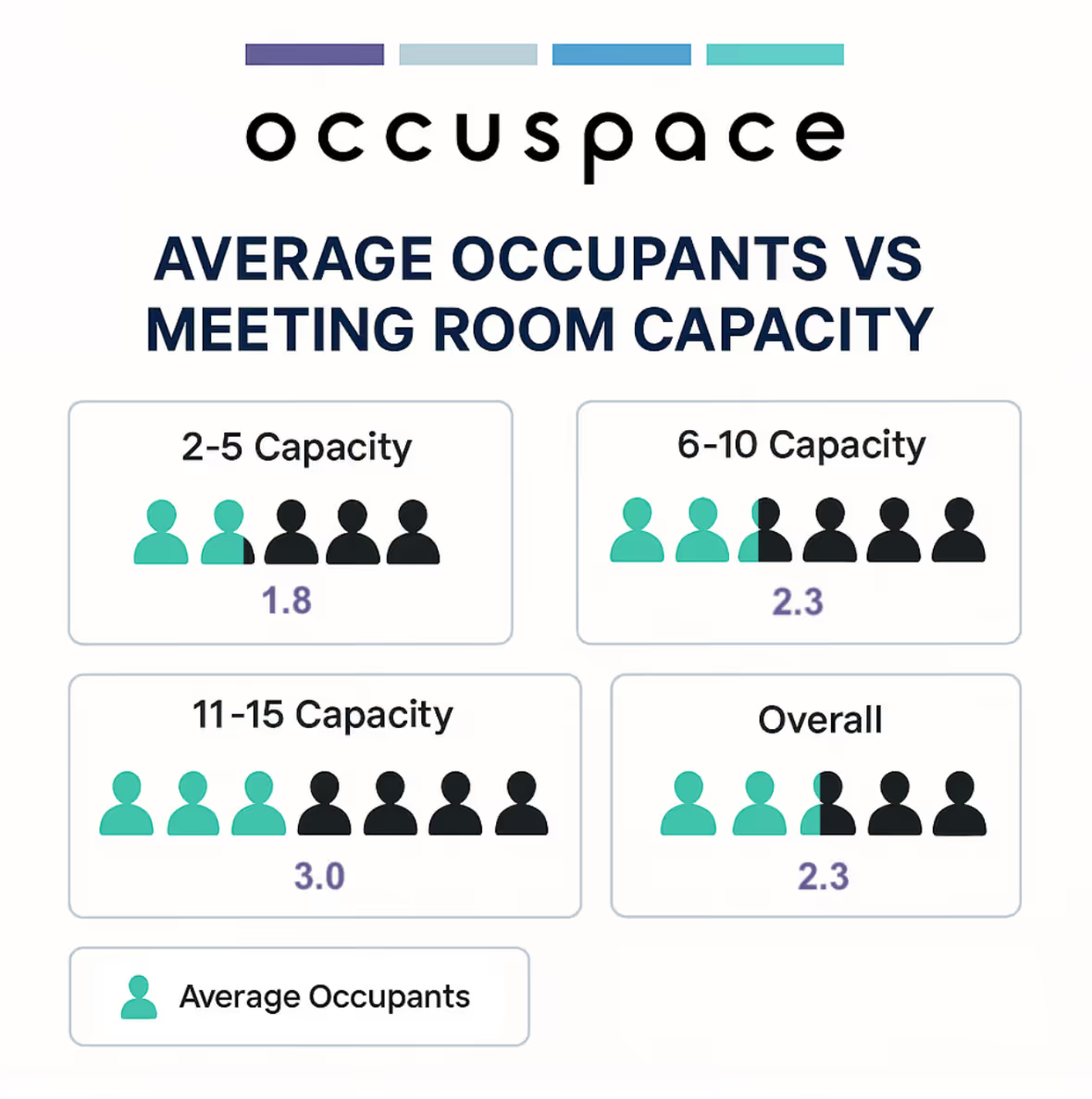
If your data can’t answer these, you’re guessing about how to use your space.
Most teams use three streams of data, but each tells only part of the story.
Combine all three. Now you see booked rooms that stayed empty, spaces used off-calendar, and right-size your floors. A room booked from 2 to 3 PM with badge data showing the organizer arrived at 1:45 but sensors confirming it stayed empty means you’ve got a ghost meeting. You can’t spot these without all three data points.
Don’t pick tech first. Pinpoint the problem you need to solve. Your goal shapes your data model, integrations, reporting, and success measures.
You need data you can trust, not best guesses or hallway surveys.
This matters more than most teams expect.
Create a room inventory first. List every room by type, capacity, floor, which system books it, and known pain points. Don’t forget huddle rooms, phone booths, focus rooms, shared spaces, and amenity areas.
Focus on rooms that get the most complaints. Tackle large rooms that sit empty and small rooms that are always booked. Test your approach with these before expanding.
Room data tells you if a space is in use. Floor or zone data shows if meeting room pressure comes from lots of people, a poor room mix, or off-calendar use. Occuspace Micro is for single rooms. Macro sensors cover bigger areas. Plan for both kinds of data.
To see real use, turn to occupancy sensors. Bookings and badges can’t confirm if a room got used. Sensors do. But pick the right one for each space.
Occuspace Micro fits conference rooms, huddle rooms, phone booths, and focus rooms. It uses mmWave technology - no cameras and no personal info. Micro shows if a booked room got used, catches no-shows, ghost meetings, unbooked use, and mismatches between group size and room size.
Plug it in and go. It covers about 400 square feet, scans 120 degrees, and has a 19-foot range. Check product specs before including numbers in official documents.
Micro Sensors send data through at least one Macro Sensor, so plan their spots together. Always check coverage, power, relay needs, and data fields with Occuspace before installing.
Macro Sensors fit open floors, shared spaces, cafeterias, lobbies, and zones. They spot if peak attendance or the wrong room mix is driving demand. Macro is also privacy-first with no cameras or personal info. Just plug into a wall or PoE. No infrastructure changes needed.
Wi-Fi data gives big-picture occupancy by building or floor. But it’s not granular enough for room use and might lack the same privacy model. Occuspace works with HPE Aruba for easier setup and better signals. Verify Aruba settings before rollout.
Workplace analytics should focus on spaces, not people. Use no cameras, no PII, anonymous aggregate counts, and never track named attendance. This builds trust and supports adoption.
Occuspace collects zero personal data and is fully GDPR and CCPA compliant. Sensors see Wi-Fi and Bluetooth activity but never connect to devices. MAC addresses get hashed on the sensor with a daily changing salt. No original values are stored ever.
Say the program measures space performance, not people. The goal is to give more access to rooms, cut waste, and improve real estate decisions. Be open about what you measure and why. Transparency builds trust.
You want a single, clear view combining sensor data, bookings, and sometimes badge or app data. Occuspace adds the actual-use layer with the Customer API and CSV exports. Always check integrations and workflows before promising features.
This is the top waste signal. Compare bookings with occupancy to spot meetings that never happened, unbooked use, early finishes, and more. Recurring no-shows are a huge capacity drain. Analytics catch them.
A no-show is a booking with no actual occupancy. A ghost meeting is a recurring booking that never happens. Numbers show 20 to 35% of meeting room bookings are ghost meetings, reserved but never used. These patterns hide open space.
Unused bookings can be released if your system supports it. Always verify platforms, permissions, and business rules before turning on auto-release.
Show live room availability with digital signage. Occuspace can display Count, Capacity, Percent Occupied, and Busyness Level for any space. Always check display and app integrations before going live.
Occuspace installs move fast: scope in 1 - 2 days, install in 1 - 3 days, go live in under a week. But always plan a validation period. Don’t make decisions until you trust your data.
Start with one floor or a mix of different rooms. Capture typical and peak workdays. Tuesdays and Wednesdays are usually busiest, so include both in your baseline.
Check sensor output against room reality. Review odd data, naming, capacity, and mapping. Cross-check with bookings and badge data. The numbers might not always match up. Decide upfront which number wins in each case.
Averages can hide issues. A room empty 80 percent of the time but packed every Tuesday at 10 AM looks fine by the average. Always show peaks too, and break data down by day and hour.
The analytics module in Occuspace makes pulling these easy.
Use booking and occupancy to spot large rooms with small groups, packed small rooms, or spaces people avoid because of layout or location. Small rooms and phone booths can disappear in averages. Always break them out in your reporting.
Analytics can guide cleaning, HVAC, and services. Demand-based cleaning can save 20 to 30 percent, and sensor-driven ventilation can save about $0.50 per square foot per year. Results will vary by building and setup.
Even a simple grace period across a 50-room portfolio can open up a lot of space.
These ghost meetings quietly lock out a lot of open rooms.
Yes. Platforms like Occuspace combine privacy-first sensors, dashboards, booking data, APIs, and signage to show how rooms actually get used. No cameras or personal data involved. That makes legal and staff buy-in easier.
Room-level sensors show if a room’s actually in use. Bookings show plans. You need both. When you combine sensors (use) and bookings (intent), you spot no-shows, ghost meetings, and unbooked use that neither reveals on its own.
Use APIs, CSVs, or connectors to link sensor and calendar data. Occuspace has a REST API for live and historic data you can join with bookings in your reporting tools. Always check your booking app compatibility before you set up flows like auto-release.
Compare bookings with actual use from sensors. Spot unused bookings, apply grace periods, review ghost meetings, and release rooms automatically only if your system supports it. Always report usage by room or policy - not by person.
Try room-level sensors, live views, or digital signage. Occuspace offers real-time outputs for every room. Always check that displays or apps integrate before rolling out.
Yes. When you combine bookings and occupancy, you reveal rooms that get reserved but never used - and spaces people grab with no reservation. Occuspace shows both patterns in the analytics portal. The focus is on spaces, not people - no names or cameras ever.
Meeting room complaints usually mean you’re missing data, not missing rooms. Bookings show what people planned, but only occupancy data shows what happened. When you use both, you see the truth: sensors confirm use, booking links spot no-shows, and clear privacy keeps everyone comfortable.
Occuspace Micro tells you what’s happening in each room. Macro sensors show the big picture across floors. Customer API, CSVs, dashboards, and signage pull all your data together. Your teams get one source of truth.
Fix your room mix. Release no-shows. Show employees open space. You’ll often find you don’t need to build more rooms at all. See how Occuspace can help you roll out conference room analytics with anonymous, camera-free data across your workplace.



